Article
Headless Wix for Australia
What headless Wix actually is, the seven benefits that matter to an Australian business, the five limits nobody markets, and a decision checklist for choosing between Wix Studio, headless Wix, and a fully custom build.
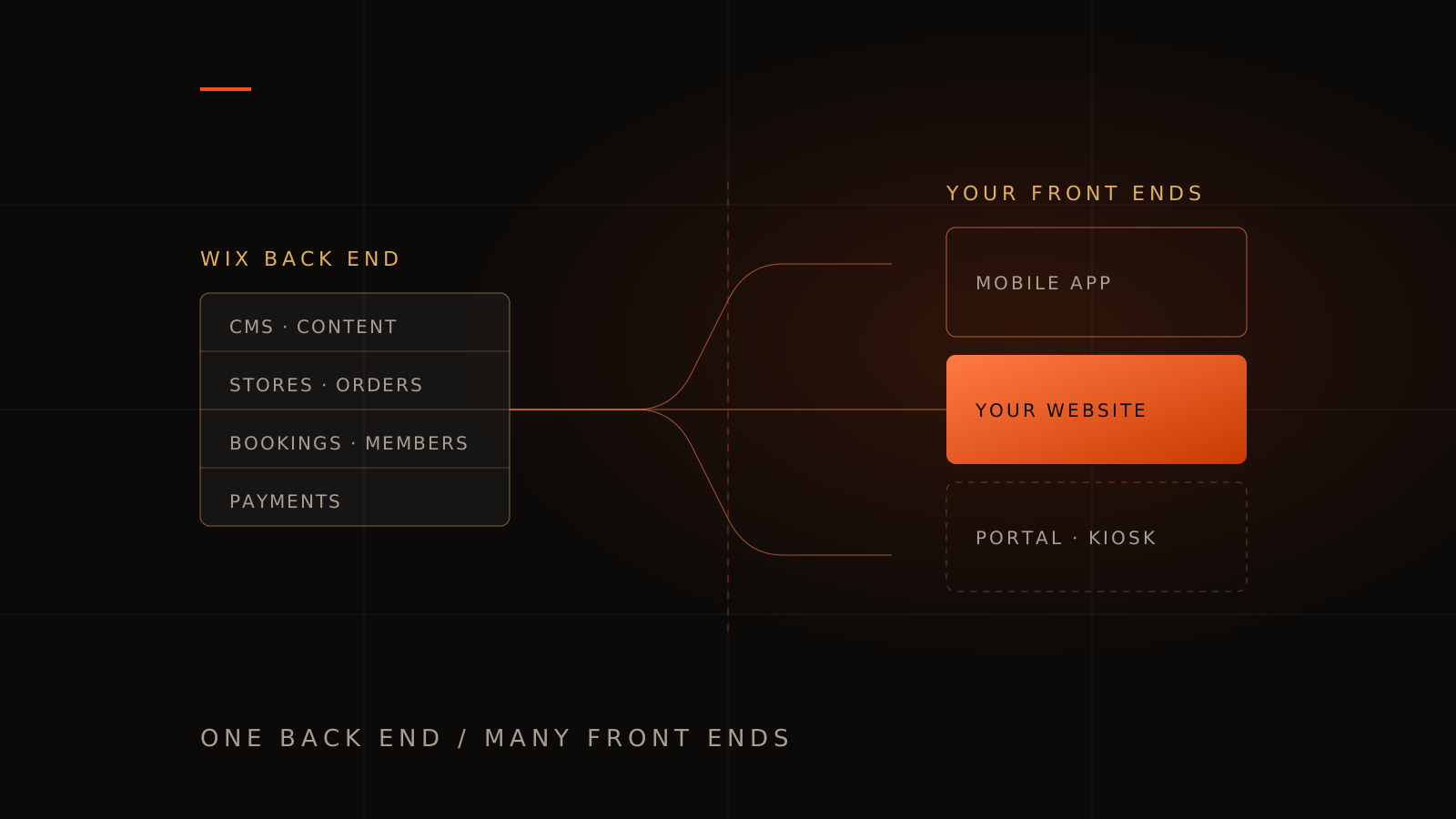
Most businesses meet Wix as an all-in-one product: one editor, one dashboard, one published site. Headless Wix breaks that bundle in half — and for a certain kind of business, the half you throw away is the half that was holding you back.
This guide explains what headless Wix is in plain English, the benefits that actually show up in revenue, the limits nobody puts on a landing page, and how to decide between Wix Studio, headless Wix, and a fully custom build. Written for Australian owners and marketing managers, not developers.
What is headless Wix?
Headless Wix is an architecture where Wix runs the business back end — products, orders, bookings, events, memberships, payments and CMS content — while your website front end is built and hosted separately, pulling that data in through Wix's APIs. Your team keeps the familiar Wix dashboard. Your customers never see a Wix-built page.
The word "headless" describes the split. The "body" is the back end: the database, business logic, and admin tools. The "head" is the front end: the pages, layouts, animations and interactions a visitor experiences. In standard Wix the two are welded together, which is why the editor both helps you and boxes you in. Going headless removes the welded head and lets you build your own.
Wix officially supports this. The platform exposes eCommerce, Bookings, Events, Pricing Plans, Blog, Members and its CMS through a documented JavaScript SDK and REST APIs, under a single authentication model covering site visitors, logged-in members, and admin operations. Wix states that calling those APIs carries no per-request fee, and that the infrastructure carries SOC 2 Type II, HIPAA and GDPR compliance out of the box.
The two ways to go headless with Wix
This distinction decides your budget, so get it right early. Wix offers two paths, and they are not equally suited to every business.
| Wix-managed headless | Self-managed headless | |
|---|---|---|
| Who hosts the front end | Wix | You (Vercel, Netlify, AWS, your own infrastructure) |
| Framework | Astro is first-class; React, Vue, Svelte and Solid supported | Anything — Next.js, Nuxt, Remix, Astro, React Native |
| Authentication setup | Automatic on the Astro integration | You configure the OAuth headless client yourself |
| SEO plumbing | Some tags, robots.txt and sitemap.xml handled; item pages still need code | Entirely yours to build — and entirely yours to control |
| Best for | Getting a fast, custom-looking site live without a DevOps burden | Businesses with real product ambition, unusual logic, or multi-app plans |
| Ongoing overhead | Low | Real — builds, deploys, monitoring, dependency updates |
Wix-managed is the sensible default for a marketing site that needs to look bespoke. Self-managed is where the interesting work lives: custom quoting flows, portals, native apps sharing one back end, or a front end that has to integrate with systems Wix has never heard of. That second category overlaps heavily with what we build as custom software.
Seven benefits of a headless Wix build
1. Performance becomes something you control
A standard Wix page ships the platform's rendering framework alongside your content. That payload is the single biggest reason Wix sites struggle on mobile Core Web Vitals. Google's thresholds are public and unforgiving: Largest Contentful Paint under 2.5 seconds, Interaction to Next Paint under 200 milliseconds, Cumulative Layout Shift under 0.1.
Headless removes the platform payload from the equation. With static generation or server-side rendering you send the browser markup and a fraction of the JavaScript. Whether you hit those thresholds is then down to your build discipline rather than a vendor's roadmap — which is exactly the trade a serious business wants.
2. Design stops negotiating with a template
Editors have edges. The moment a brand needs a pinned scroll narrative, a multi-step configurator with conditional pricing, cursor-reactive motion, or a layout that behaves differently at four breakpoints, you start fighting the tool. Headless removes the argument entirely: the front end is code, so the design is whatever the design should be. This is the same reason we argue for custom website design over template work in competitive Melbourne categories.
3. One back end can feed many front ends
This is the benefit that ages best. One Wix project can power a marketing website, a customer portal, an in-store kiosk, and a React Native app — all reading the same products, bookings and members. Your staff update a price once. Every surface changes.
Businesses that later want a companion app usually discover the back end has to be rebuilt. Headless makes that a front-end project instead, which is a materially cheaper conversation. If that is on your roadmap, our app development work almost always starts from this question.
4. Your team keeps the dashboard they already know
This is the quiet advantage over most headless stacks. Traditional headless projects hand non-technical staff an unfamiliar CMS and an invoice for training. With headless Wix, the person who adds products, checks orders, manages the booking calendar and answers enquiries stays in the exact Wix dashboard they used yesterday. The developer changes; the operator does not.
5. SEO and AI visibility become fully controllable
On a hosted builder you get an SEO panel: title, description, some structured data, whatever the platform decided to expose. Headless gives you the markup itself — canonical logic, trailing-slash policy, hand-written JSON-LD for Organization, Service, Article, FAQPage and Breadcrumbs, internal linking architecture, and server-rendered HTML that crawlers and AI assistants can read without executing JavaScript.
That last point matters more each quarter. Answer engines and AI assistants reward clean, server-rendered, well-structured pages with explicit entity markup. A platform's SEO tab cannot give you that; a codebase can. It is the foundation our SEO and marketing services assume, and the reason a migration should always be planned alongside a redesign-without-losing-rankings checklist.
6. Payments and compliance you do not have to build
Building checkout is expensive, and getting it wrong is worse. Headless Wix lets you redirect to Wix-hosted checkout for the regulated parts of the journey, so card handling, PCI scope and tax logic stay on Wix's infrastructure — with SOC 2 Type II, HIPAA and GDPR compliance behind it. You get bespoke product discovery and a battle-tested payment step.
Compare that with wiring payments yourself. It is very doable — see our guide to what you can actually do with Stripe — but it is a project with its own timeline and its own liabilities.
7. The cost curve is unusually flat
Wix Headless is free to connect. You move to a Wix Premium plan when you need payments, a custom domain and in-depth analytics, and that plan is billed the same way any Wix subscription is. There is no developer tier, no enterprise unlock, and Wix states there is no per-API-call charge no matter how much traffic the front end drives.
For a growing Australian business, that is a friendlier curve than most headless commerce platforms, where success is billed as usage.
What headless Wix cannot do
Every honest architecture guide needs this section. These are the constraints we walk clients through before anyone signs anything.
Checkout is not yours
Certain flows must hand off to Wix-hosted pages rather than living in your front end. As of August 2026 those are: the booking page, bookings checkout, eCommerce checkout, events checkout, paid plans checkout, and the product details page. You can style the journey either side of them and redirect visitors back afterwards, but the payment step itself renders on Wix's domain unless you configure a Wix pages domain. If pixel-perfect control of checkout is a hard requirement, headless Wix is the wrong platform.
You inherit the front end, permanently
Everything the editor used to do for free is now yours: builds, deploys, dependency updates, accessibility, browser testing, uptime monitoring, and someone to call at 11pm. Headless does not remove work, it relocates it — from fighting a template to maintaining a codebase. Budget for that, or choose managed hosting and a retainer that covers it.
Site-wide Wix apps and the SEO panel do not come along
Third-party Wix apps that inject front-end widgets assume a Wix-rendered page. On a headless front end they generally do not apply, and neither does the Wix SEO panel. Anything those tools were quietly handling — pop-ups, chat widgets, review displays, redirects, meta tags — becomes a deliberate decision in your build.
Two systems means two mental models
Your team manages business data in Wix and content structure in code. That is fine when the boundary is drawn well and painful when it is not. Deciding early which fields live in the Wix CMS versus which live in the repository is the single most important architectural conversation of the project.
Getting out is still not trivial
Headless improves your position — your front end is portable code you own — but the business data still lives in Wix, and Wix's export paths remain partial. You are trading a total lock-in for a partial one. That is a real improvement, not an escape.
Headless Wix vs Wix Studio vs a fully custom build
| Wix Studio | Headless Wix | Fully custom | |
|---|---|---|---|
| Design ceiling | High within the editor | Unlimited | Unlimited |
| Performance ceiling | Capped by platform payload | Very high | Very high |
| Who edits content | Anyone | Anyone, in the Wix dashboard | Whoever the CMS was built for |
| Back end to build | None | None | All of it |
| Checkout control | Wix | Wix-hosted handoff | Yours (Stripe, etc.) |
| Multi-app ready | No | Yes | Yes |
| Upfront cost | Lowest | Middle | Highest |
| Data portability | Poor | Partial | Complete |
The pattern is consistent: headless Wix is the middle path. It buys most of the design and performance freedom of a custom build without the cost and timeline of building commerce, bookings and memberships from scratch. If you are still earlier in that decision, start with custom website vs Wix or Squarespace, which covers the ground before headless is on the table.
Is headless Wix worth it?
Choose headless Wix if most of these are true:
- You already run stores, bookings, events or memberships on Wix and the data is healthy.
- Non-technical staff must keep managing that data without retraining.
- Design or mobile speed is now costing you enquiries, and the editor is the bottleneck.
- You compete for search terms where Core Web Vitals and technical SEO are genuinely contested.
- A second surface — an app, a portal, a kiosk — is plausible within two years.
- You have a developer or studio on retainer, because the front end now needs one.
Do not choose headless Wix if:
- Your site is five pages of brochure content. A well-built Wix Studio site is cheaper and entirely adequate.
- Nobody will own the codebase after launch. An unmaintained headless front end decays faster than a template ever will.
- You need full control of the checkout experience.
- You are already planning to leave Wix. Migrate once, properly, rather than building a front end onto a back end you intend to abandon.
- Your commerce logic has outgrown what Wix models — complex B2B pricing tiers, multi-warehouse inventory, unusual tax handling. At that point look at a purpose-built ecommerce platform instead.
What does a headless Wix build cost in Australia?
Two separate line items, and conflating them is the most common budgeting mistake.
The platform. Wix Headless is free to connect. A Wix Premium plan is what unlocks payments, a custom domain and in-depth analytics; it is billed by Wix, separately from any build fee, and current pricing is on Wix's own site. There are no additional API fees.
The front end. This is a website development project and prices like one. Our published Melbourne website packages start at $399 + GST for a focused lead site, $1,099 + GST for up to ten pages, and $4,799 + GST for larger builds — with the full breakdown in our guide to what a website costs in Melbourne. A headless front end sits at the more involved end of that range, because API integration, caching strategy and deployment are real work.
The comparison that matters is not headless Wix versus a template. It is headless Wix versus rebuilding stores, bookings, memberships and payments yourself — which is a five-figure project before a single page is designed. Seen that way, the architecture is often the frugal choice. Our Firebase guide walks through the same trade-off from the fully custom direction.
How we approach a headless Wix project
- Audit the back end first. Product data, booking services, member records and CMS collections get reviewed before any design work. A headless front end inherits whatever mess exists underneath it.
- Draw the content boundary. Decide explicitly what lives in the Wix CMS and what lives in the repository, and write it down. This one document prevents most future arguments.
- Design without the editor's constraints. Interactive, brand-led, motion-aware — the reason for going headless in the first place.
- Build with SEO as a requirement, not a phase. Server-rendered pages, URL parity with the existing site, redirects only where unavoidable, and structured data written by hand.
- Instrument and hand over. Analytics events on real conversion actions, Core Web Vitals monitoring, and documentation so the next developer is not archaeology.
If you are weighing this up for a real site, a free Discovery Session will tell you honestly whether headless is warranted yet. Plenty of the time the answer is that a better-built conventional site solves the problem for a third of the money, and we would rather say so.
Headless Wix FAQs
Is headless Wix the same as Wix Studio?
No. Wix Studio is an advanced visual editor — you still build and host pages inside Wix. Headless Wix keeps only the Wix back end and lets you build the front end in your own framework, hosted by Wix or by you.
Do I need to rebuild my existing Wix site to go headless?
You rebuild the front end, not the business data. Products, orders, bookings, members and CMS collections stay where they are and keep working. That is the main reason headless is cheaper than a full replatform.
Can headless Wix rank well in Google?
Yes, and typically better than a standard Wix site, because you control server-side rendering, page weight, markup, canonicals, structured data and internal linking. Ranking still depends on content and links — headless removes technical ceilings rather than guaranteeing results.
What frameworks work with headless Wix?
Astro has the deepest integration on Wix-managed projects, with React, Vue, Svelte and Solid supported. Self-managed projects can use Next.js, Nuxt, Remix, Astro or React Native and deploy to Vercel, Netlify or AWS.
Can I build my own checkout with headless Wix?
No. eCommerce, bookings, events and paid plans checkouts run on Wix-hosted pages that you redirect visitors to and back from. You control everything either side of that step, but not the payment page itself.
How much does Wix Headless cost?
Connecting is free, and there are no per-API-call fees. You pay for a Wix Premium plan when you need payments, a custom domain or in-depth analytics, plus the separate cost of designing and building your front end.
Will my staff still be able to update the website?
They keep using the Wix dashboard for products, prices, bookings, blog posts and CMS content, and those changes appear on the live site. Page layouts and new page types move into the codebase, so they become a developer task rather than a drag-and-drop one.
Is headless Wix a good idea for a small Melbourne business?
Only if design, speed or a second app surface is genuinely limiting growth. For a straightforward local service business, a well-built conventional site delivers more enquiries per dollar. Headless earns its cost once the platform, not the marketing, is what is holding you back.